Why Schema Design Comes First
The most expensive mistake in CDP implementation is building without a defined schema. When events have inconsistent names, missing properties, or undefined conventions, every team that touches the data spends hours deciphering what "btn_click" or "conversion_event_3" means. Retroactively cleaning a schema is significantly harder than designing it correctly from the start.
A Tracking Plan — the document that defines all events, their properties, and when each fires — is mandatory before any implementation begins. Our CDP implementation service always starts here.
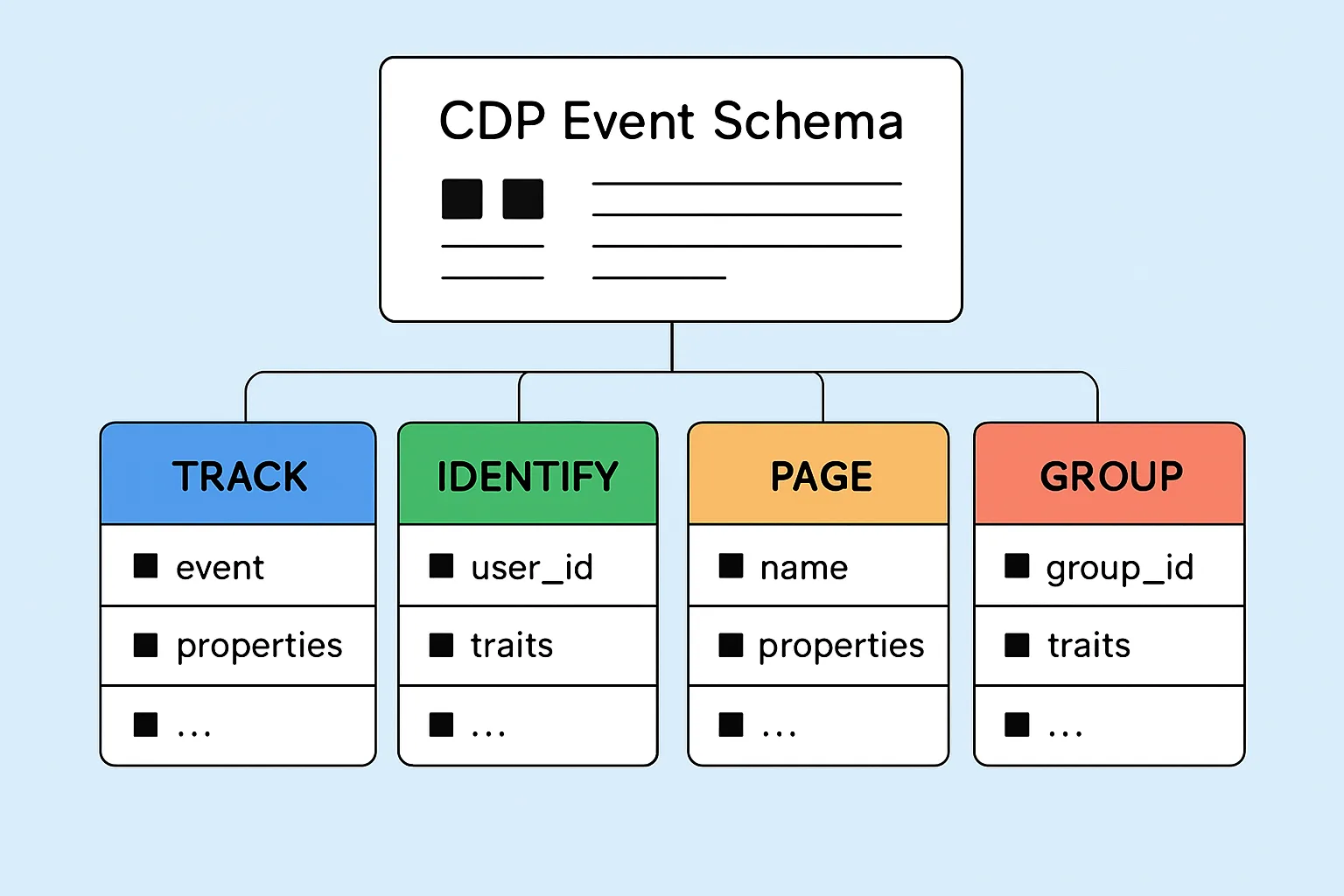
The Four CDP Call Types
Track (Events)
Track calls record specific user actions. They're the core of your CDP data and the richest behavioral signal you'll collect.
Format: analytics.track('Event Name', {property1, property2, ...})
Naming convention: Use "Object Action" format in Title Case:
- "Product Viewed" not "view_product" or "productViewed"
- "Order Completed" not "purchase" or "checkout_complete"
- "Form Submitted" not "lead_submitted" or "formSubmission"
This convention follows industry standards (Segment's Spec) and makes event names immediately readable across tools.
Properties should always include:
- The primary entity ID (product_id, order_id, form_id)
- User-relevant context (category, value, source)
- Timing-relevant data when applicable (trial_days_remaining, days_since_last_purchase)
Identify (User Profiles)
Identify calls link a user to their profile and update their traits. Fire an identify call whenever you learn something new about a user's identity or profile.
Format: analytics.identify('userId123', {email, name, plan, company, createdAt})
When to fire:
- User registers or creates an account
- User logs in
- User updates their profile
- Server-side: when a purchase updates their LTV or plan tier
Critical traits to always include:
email— the universal identifier across marketing toolsname(or firstName/lastName)createdAt— ISO 8601 timestamp of account creationplanorsubscriptionTierfor SaaStotalRevenuefor customers (updated server-side)
Page (Pageviews)
Page calls record when a user views a page. They provide the navigational context for understanding the customer journey.
Format: analytics.page('Category', 'Page Name', {url, path, referrer, title})
The category and page name allow you to filter page views by section in your CDP and destinations. "Pricing" page views are a high-value signal for your sales team; "Blog" page views are lower intent.
Many CDPs auto-capture page calls — verify whether your implementation already fires them correctly or whether you need to add them manually.
Group (Account-Level Data for B2B)
Group calls associate a user with an account or organization. Critical for B2B companies where individual users belong to companies with their own attributes.
Format: analytics.group('accountId456', {name, industry, plan, employeeCount})
When to fire: When a user signs up with a company, switches teams, or when account attributes change.
Group calls allow you to build segments at the account level — "all users in accounts on Enterprise plan" or "all users at accounts with 50+ employees."
Common Schema Mistakes to Avoid
- Inconsistent naming: "Add to Cart" and "add_to_cart" and "addToCart" are treated as three different events
- Missing identify calls: If you only fire track events without identifying users, profile stitching fails
- PII in track events: Don't put email addresses in track event properties — use the identify call for PII
- Too granular: "Button Clicked — Header — Get Started — Desktop — Chrome" should be "CTA Clicked" with properties for location, text, device
- Inconsistent property types: Revenue as a string in some events and a number in others breaks aggregations
The Tracking Plan as Living Document
Your Tracking Plan should be version-controlled and updated whenever new events are added. Include for each event: event name, description, trigger condition, required properties, optional properties, which destinations receive it, and which team owns it.
Tools that help: Segment Protocols, Avo.app, Amplitude Data, or even a well-structured Google Sheet. The tool matters less than the discipline of updating it. Contact our CDP team for help designing your initial Tracking Plan.
Need expert tracking setup?
Our Google Tag Manager experts have delivered 500+ tracking setups with a 98% success rate.
Get a Free Consultation →