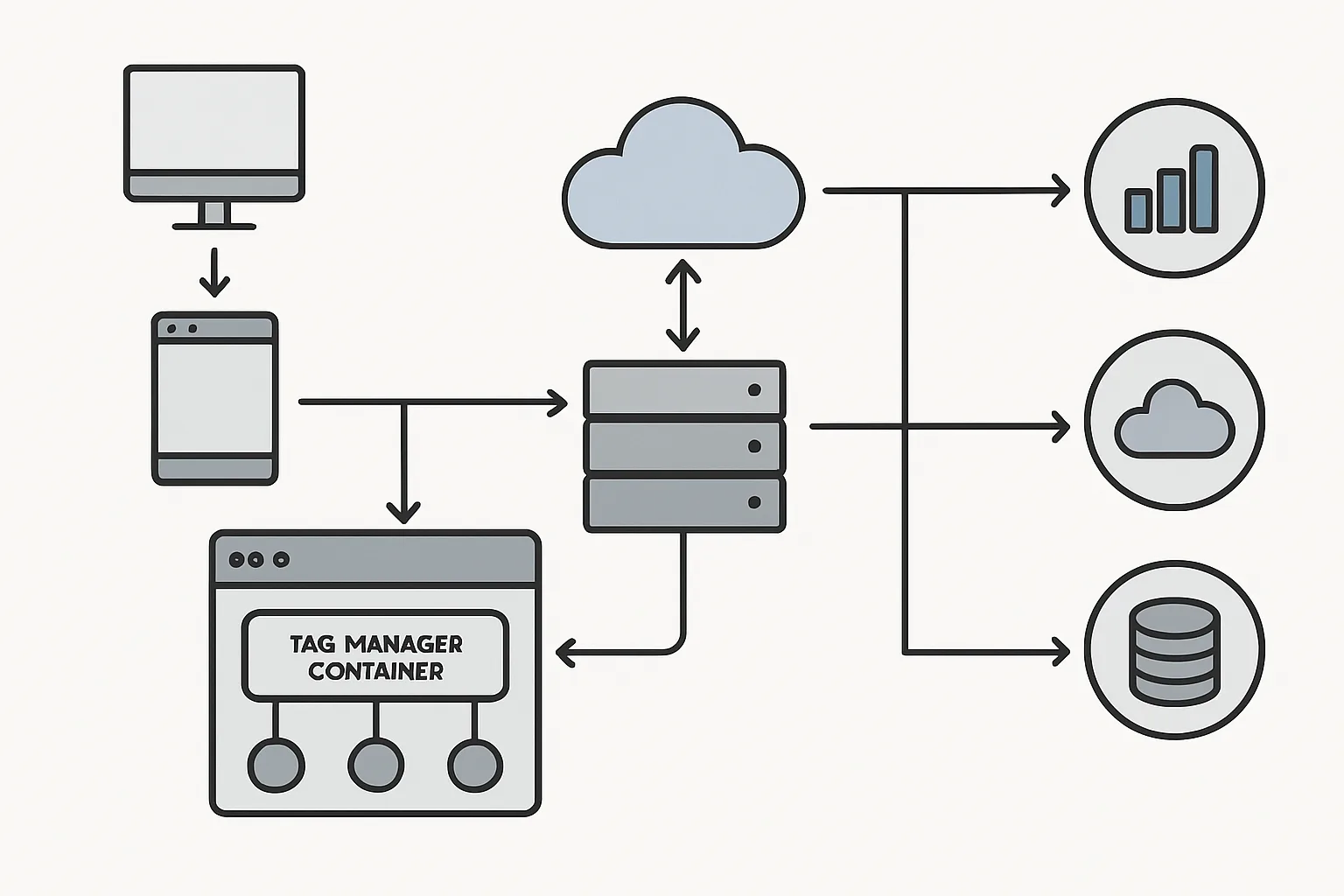
Understanding the Architecture Before Building It
Server-side tracking introduces several new components between your website and analytics platforms. Understanding how these components connect prevents configuration mistakes and makes troubleshooting significantly easier.
Architecture Layer 1: Browser (Client Side)
The user's browser still runs code. In a hybrid server-side setup:
- Your web GTM container loads on every page
- The Google tag JavaScript library loads and initialises
- When events fire (page view, purchase), the GA4 library sends them to collect.yoursite.com (not to google-analytics.com)
- Other browser-specific events (click tracking, scroll depth) may still be sent directly to platforms via web GTM tags
Architecture Layer 2: Tagging Server (sGTM)
Your sGTM server (running at collect.yoursite.com) acts as the central processing hub:
- Receives incoming events from the browser (GA4 Measurement Protocol format)
- The GA4 client parses the incoming request and makes event data available to tags
- Variables in the server container extract event parameters (transaction value, customer email, event name)
- Tags fire based on trigger conditions, forwarding events to downstream platforms
- The server sets first-party cookies in the response (bypassing ITP)
Architecture Layer 3: Downstream Platforms
The sGTM server forwards events to:
- Google Analytics 4 (via GA4 Measurement Protocol)
- Meta Conversions API (via Meta Graph API)
- Google Ads (via conversion signals or offline conversion API)
- Other platforms (TikTok, Pinterest, LinkedIn CAPI) if configured
Data Flow: Standard Purchase Event
1. User clicks "Buy Now" on product page
2. Browser fires purchase event via GA4 JS library
3. Request → collect.yoursite.com/g/collect (your sGTM server)
   Payload: event=purchase, value=99.00, transaction_id=12345, currency=GBP, user_data={em: [hashed email]}
4. sGTM GA4 Client processes the request
5. sGTM sets _ga cookie via Set-Cookie header (2-year expiration)
6. sGTM forwards to GA4: POST analytics.google.com/mp/collect
7. sGTM forwards to Meta CAPI: POST graph.facebook.com/events
8. Response 200 OK returned to browser
Alternative Flow: Webhook (Backend Event)
1. Stripe confirms payment → sends webhook POST to collect.yoursite.com/stripe-webhook
2. sGTM Custom Client receives and validates webhook
3. Client looks up stored GA4 client_id for this order_id in Firestore
4. Creates event: event=purchase, value=99.00, client_id=[stored], transaction_id=12345
5. Forwards to GA4 and Meta CAPI with enriched data
Key Components Summary
- Web GTM Container: manages what events the browser collects and where they are sent
- Google Tag (gtag): the JavaScript library that sends events to sGTM
- sGTM Tagging Server: receives, processes, enriches, and forwards events
- GA4 Client: the sGTM component that receives and parses GA4-format events
- Custom Domain (collect.yoursite.com): makes the tagging server first-party
- Platform Tags: sGTM tags that forward events to GA4, Meta, Google Ads, etc.
Summary
Server-side tracking architecture has three layers: browser (collects events), tagging server (processes and enriches), and downstream platforms (receive and act on data). Understanding data flow through each layer is essential for debugging, optimising, and extending your server-side tracking setup.
See our Server-Side Tracking service for architecture design and implementation.
Need a custom architecture for your server-side tracking? Contact Adslytics.
Need expert tracking setup?
Our Google Tag Manager experts have delivered 500+ tracking setups with a 98% success rate.
Get a Free Consultation →